

Frequently Asked Questions...
The capacitor plague is...
A story exists that an engineer stole a formula and resold it to another manufacturer...
Here’s the story...
What type of capacitors do you use?
We use Panasonic, Nichicon and Rubycon capacitors. If we have to substitute a different brand it will be clearly noted in the listing.
The Panasonic capacitors we use are Series, FR, FM, FC, EB, NHG, EE, ED, HB, HC
The Nichicon capacitors we use are Series, HV, PW
The Rubycon capacitors we use are Series, ZLJ, ZLK
The primary capacitors we use are Panasonic, Series FR, FM & FC in that order.
I’ll go to Radio Shack and get my capacitors.
Radio Shack is a fine retail outlet, however their selection of capacitors is limited. When I first started repairing LCD monitors, I went there one evening when I discovered I needed a capacitor I didn’t have. Luckily, they had one that was the correct capacitance (uF), however all of their capacitors were rated at 85 degrees Celsius. I needed one rated at 105 degrees Celsius.
I bought one anyway and installed it. The power supply board immediately started making a high pitched whine. I removed it until I could order the correct capacitor.
Low temperature capacitors work fine in low temperatures. The environment inside your LCD monitor is not low temperature, just put your hand behind an LCD monitor.
When you install a low temperature capacitor in a high temperature environment, the life of the capacitor will be shortened in relation to the temperature it’s in. The higher the temperature, the shorter the life. I think you get the picture...
Can you change a lower voltage capacitor with a higher voltage capacitor?
Yes, but we do not recommend it. The engineers that designed your monitor selected components to safely operate the LCD monitor or TV. Replacing or modifying the board may result in damage to the board or may shorten it’s life.
There are numerous articles on the web that discuss increasing the voltage of the capacitors. Should you wish to increase the capacitor voltage we recommend that you research your decision carefully.
Normally, increasing the voltage will also result in an increase in the capacitor’s size, both the diameter and the height. The higher voltage capacitor may no longer fit into the space previously occupied by the lower voltage capacitor.
The specifications of the capacitors we use are higher than those used by the OEM’s, therefore increasing the voltage to increase the life of the capacitor is neither needed nor recommended.
USPS Shipping, Domestic and International
USPS (United States Postal Service) First Class domestic mail takes from 2-5 business days to reach it’s destination in the continental United States. Priority Mail, takes from two to three business days. The USPS delivers on Saturday at no extra charge.
International mail delivery varies from country to country. If you don’t receive your shipment within 3 weeks, contact us for further direction. We can either refund your payment or send another kit.
The USPS issues Track & Confirm numbers for all parcels. The Track & Confirm number can be checked at the USPS web site, HERE.
Please note, although Track & Confirm numbers are issued for all shipments, First Class and Priority International shipments are NOT TRACKED. If you check your international shipment via the USPS web site, you will not receive any tracking information for either of these two shipping methods. The Track & Confirm web page will only show that the shipment information was received by the USPS. Once a shipment leaves our office, it’s fate is in the hands of the USPS and if it is an international shipment, the postal services of the countries the parcel passes through. It is not unusual for international shipments to be inspected by customs. This inspection can significantly delay the delivery. Should you ask us when a shipment will arrive, we can only provide the general information provided above to answer your question.
If you must have proof of delivery and shipment tracking, then please select USPS International Express Mail to ship. You will receive Track & Confirm information with USPS International Express Mail. We do not offer UPS, Fed ex or DHL shipping.
The capacitors on my monitor’s or TV’s power supply board are different from those in the kit, what should I do now?
We always recommend that you check the capacitors on your LCD monitor’s or TV’s power supply board BEFORE your place an order, failure to perform this may result in an ordering error.
LCD monitor manufacturers make changes during the production run. They remove one board and replace it with a different one. When we become aware of this, we will post a new repair kit for that version of the LCD monitor. Some LCD monitors have as many as 12 different power supply boards.
Rest assured, if you do happen to receive different capacitors due to an error on our part or because your LCD monitor has a different power supply board in it, we will immediately send you the correct capacitors at our expense. Please indicate which capacitors you need, and the quantity.
Sometimes you may find that the size of the capacitor on your board is different from the one we provided (Please refer to the photograph provided in the previous FAQ). The voltage and the capacitance are the same, but the size is different. If you come across this situation, rest assured the capacitor we provided will safely replace the original. The specifications of the replacement capacitor are in higher than OEM requirements.
Our goal is your complete satisfaction.
I need a fuse, or a transistor, or a diode or...
Our primary focus is the sale of aluminum radial capacitors for LCD monitor’s and TV’s power supply boards, and some video/logic boards. We do carry some other components such as ceramic capacitors and some fuses. Should you find you need another component, please provide us with a high quality photograph of the component, and all of the information printed on it. We will do our best to locate the component for you, and in most cases will acquire a supply of them for future sales. Please keep in mind the sourcing of these components may take several days.
I’ve heard capacitors store electricity, can I get hurt?
Capacitors do store electricity. You should always unplug your LCD monitor and let it stand for a minimum of 30 minutes before attempting any repair. Always remove the power supply board from the LCD monitor or TV before attempting any repair. NEVER WORK ON A MONITOR OR TV THAT IS PLUGGED IN!
The repair kit didn’t fix my LCD monitor or TV, what now?
Unfortunately not all LCD monitors will benefit from new capacitors, especially those that show no outward signs of capacitor failure. Should you find that after replacing the capacitors on your LCD monitor’s or TV’s power supply board your LCD monitor or TV still won’t work, then there are other resources available to assist you in trouble shooting your LCD monitor.
Trouble shooting can be very time consuming, so you will have to weight the time required vs the cost of replacement.
Should you be interested if further trouble shooting contact us and we will direct you the resources that we trust and use ourselves.
Will your repair kit fix my LCD monitor or TV?
Does your LCD monitor exhibit any of these symptoms?
|
1.
|
Slower and slower startup
|
|
4.
|
Image appears for a second or two then disappears
|
|
5.
|
Strange lines or colors
|
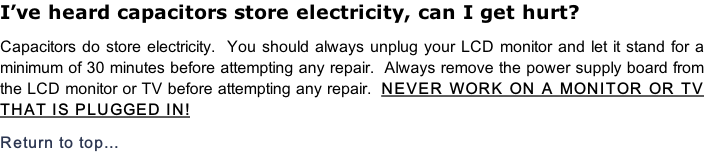
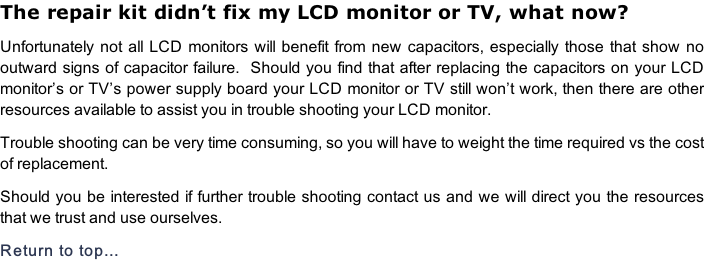
If so, then the only way to tell if capacitors are involved is to open it up and examine the capacitors inside it. The two pictures below show a typical power supply board and two of the capacitors on it. It’s very easy to identify the bad capacitor.
The top of the good capacitor will appear flat, while the bad one will be bulged out and my even be leaking some fluid.
If any of the capacitors on the power supply board appear bulged on top, then replacing them will probably help your LCD monitor. If however, all of the capacitors on the power supply board look normal, then your monitor’s problem(s) are probably related to some other component(s).
Capacitors can look normal and still be bad, this is the exception rather than the rule. There is no guarantee that replacing the capacitors will solve your monitor’s problems, however many LCD failures can be traced to bad capacitors.
The hardest part of the repair job is the first step, the disassembly of the unit. Normally monitors are more difficult to take apart than TV’s. If you find that you are getting frustrated, take a break. Frustration normally results in damage the TV or monitor. Should you find you are at an impasse, send us a few pictures of the unit and we will be happy to offer our guidance in the disassembly. The manufacturer didn’t make it easy to take these items apart, but every TV or monitor can be disassembled, it’s mind over matter and you will win!


Can’t I just order the capacitors myself, why use your service?
Of course you can!
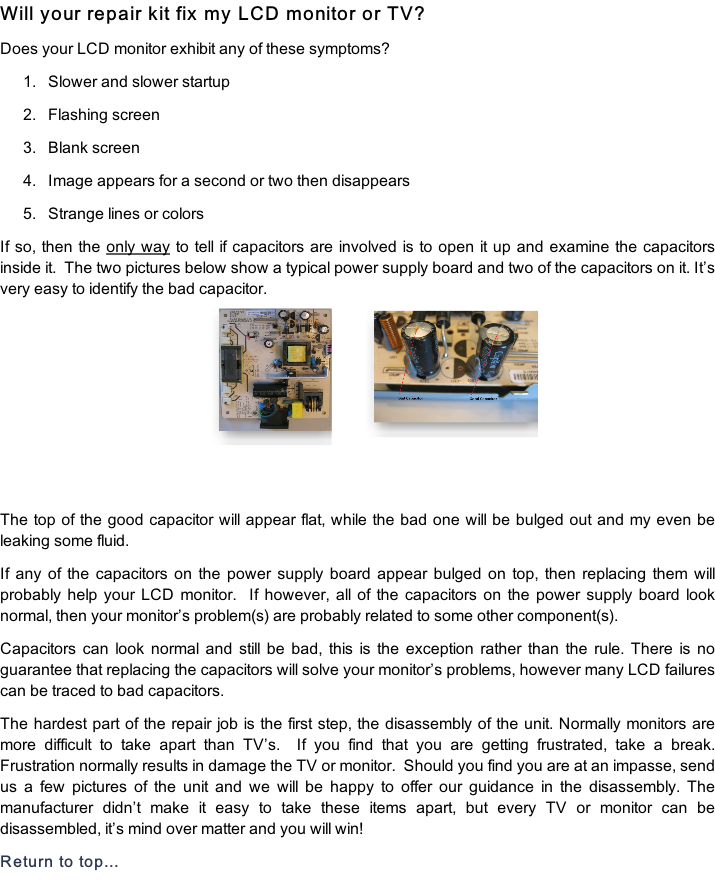
True story, the first monitor I repaired was a Samsung SyncMaster 204B. I opened it up and found a bad 25v 820uF capacitor. I went on eBay and ordered what I thought were the correct capacitors. The picture below shows one of the capacitors I received (the giant one) along side the capacitor I needed.
Needless to say, I had a little problem getting the capacitor I ordered to fit. This is just one example of the different factors that are involved in the selection of the correct capacitors. We take the following factors into consideration when we order capacitors for our kits;
|
1.
|
Size in mm x mm (we look for the smallest footprint)
|
|
2.
|
Temperature Rating in degrees Celsius
|
|
3.
|
Capacitance, in micro farads
|
|
5.
|
Lifetime @ Temperature Rating, hours @ temp.
|
|
6.
|
Operating Temperature, in degrees Celsius
|
|
7.
|
Ripple Current, in Amperes or mili amperes
|
|
8.
|
ESR (Equivalent Series Resistance)
|
All of these factors are important in the selection of the correct capacitor. We have already taken these factors into consideration when we select the capacitors for our kits. If you feel you have the experience and time to do the job, then there are plenty of sources on the web.

Feedback is very important to us. We use an automated feedback system provided to us by eBay. This system monitors our feedback. When positive feedback is received, positive feedback will be left. We hope you understand that due to the volume of sales, we depend upon this system to assist us with the management of feedback. We would rather devote our free time answering email rather than monitoring feedback.
Should you be dissatisfied in any way with your purchase from LCDalternatives, PLEASE contact us BEFORE your leave “neutral” or “negative” feedback. We will do everything humanly possible to make you happy. The last thing we want is for you to be displeased with our service.
Why don’t you include the 400v-450v capacitors in your kits?
We don't include the 400v-450v caps in the kits for two reasons... First, they are rated at several thousand hours and rarely fail... Over the years, we have seen only a few fail. The second reason, is that they are quite expensive compared to the other capacitors in the kits. We feel that since they rarely fail, coupled with their cost, most customers would prefer we not include them so we can keep our prices in the $12-15 range. By including the 400v-450v capacitors in our kits, the price of the kits would increase to $20-23 per kit!
We do sell these capacitors. Should you need one, please ask.
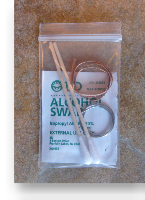
What’s in the small zip-lock bag and what are its contents used for?
We’ve added the following items to all of our repair kits to make the repair of your
monitor or TV even easier!
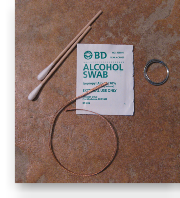
6 inches of Sn60/Pb40 0.032 inch diameter solder
8 inches of 0.1 inch (2.5mm) “Blue Type” copper de-solder wick
Isopropyl alcohol (70%) cleaning pad and two wooden/cotton swabs
Click HERE for a short instructional video on the use of the these items
We are certain that you will find these items very useful in the repair of your
monitor or TV!
Return to top...


I don’t see my model of LCD monitor or TV, what now?
There are so many different models of LCD monitors and LCD/Plasma TVs, we are discovering new ones everyday here at LCDalternatives.
If you don’t see your model, send us a list of the capacitors on the power supply board. List the capacitors in this fashion...
2 - 25v 1000uf
1 - 10v 470uf
So on and so forth...
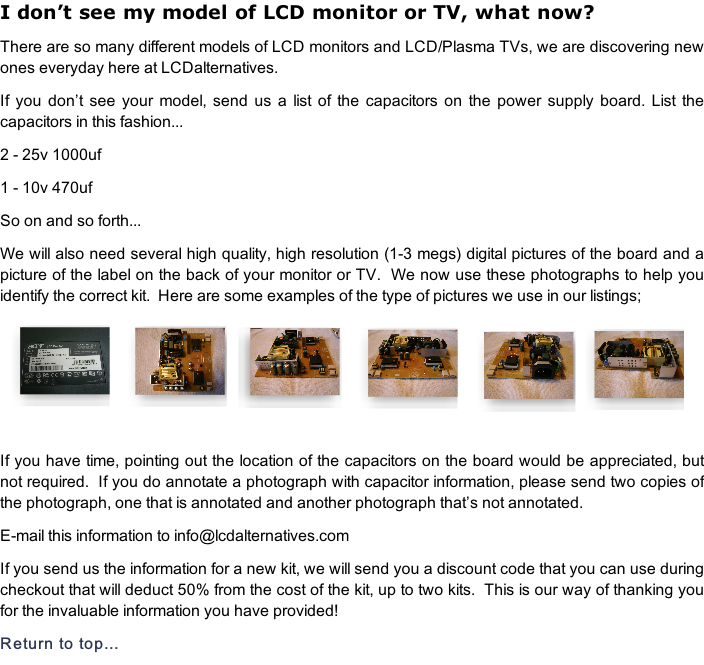
We will also need several high quality, high resolution (1-3 megs) digital pictures of the board and a picture of the label on the back of your monitor or TV. We now use these photographs to help you identify the correct kit. Here are some examples of the type of pictures we use in our listings;
If you have time, pointing out the location of the capacitors on the board would be appreciated, but not required. If you do annotate a photograph with capacitor information, please send two copies of the photograph, one that is annotated and another photograph that’s not annotated.
E-mail this information to info@lcdalternatives.com
If you send us the information for a new kit, we will send you a discount code that you can use during checkout that will deduct 50% from the cost of the kit, up to two kits. This is our way of thanking you for the invaluable information you have provided!


The data and text contained within these pages is protected by U.S. copyright laws17
USC §101 et seq. Use of this information without the express written permission
of LCDalternatives is prohibited. Violations of the copyright will be prosecuted
to the fullest extent of the law, which can include injunctions (§502), impounding
and disposition of infringing articles and/or instruments of infringement (§503),
damages and profits, including statutory and/or enhanced damages (§504), costs and
attorneys fees (§505), and criminal prosecution (§506).